I get it. Linktree takes about four minutes to set up, it’s free to start, and it solves a real problem — Instagram still only lets you put one clickable link in your bio, and nobody wants to update it every time they post something new.
But every time I see a business or creator sending their hard-earned audience to linktr.ee/yourbrand, something in me deflates a little. Not because I think you made a dumb decision — it’s genuinely convenient — but because you’re quietly giving away something valuable without realizing it.
Let me explain what’s actually happening under the hood, and then I’ll show you a better way that takes about the same amount of time to set up.
You’re Building Someone Else’s Website
Every click your followers make on that Linktree page is a visit to Linktree’s domain, not yours. That matters for a few reasons.
Link equity. When search engines evaluate your website’s authority, one of the signals they look at is how many links point to it and where they come from. When your Instagram bio links to linktr.ee, that signal goes to Linktree — not to you. If you have 15,000 followers and even a fraction of them click through, you’re routing a steady stream of engagement to a third party’s domain. You’re building Linktree’s SEO, not yours.
Analytics. Most free Linktree plans give you limited visibility into who’s clicking what. On your own site, you have full access to visitor data, behavior flows, time on page, and where people go next. That information is genuinely useful for understanding what content and offers your audience cares about. On Linktree, you’re flying partially blind — or paying for a premium tier to see data you’d get for free on your own site.
Branding. A Linktree page, even a customized one, looks like a Linktree page. Your audience knows it. It’s the digital equivalent of handing someone a business card with a Vistaprint watermark on the back. It signals that this piece of your presence wasn’t worth building out. For a business trying to project professionalism and credibility, that’s a small but real friction point.
The Platform Risk You’re Not Thinking About
Here’s the scenario nobody considers until it happens to them: Linktree changes its pricing model, goes down during a campaign, gets acquired, or — in a worst case — shuts down entirely. Your bio link breaks. Every post you’ve ever made that says “link in bio” now leads somewhere useless.
This isn’t hypothetical. Plenty of third-party services that felt permanent have disappeared or pivoted in ways that stranded their users. When your link hub lives on your own domain, you control its future completely. Nobody can take it away, raise the price on it, or change what it looks like without your permission.
What You’re Paying For
Linktree’s free plan is genuinely limited — no custom domain, Linktree branding on your page, basic analytics, and restricted design options. Their paid plans run $5–$24/month depending on the tier. That’s $60–$288/year for a page that lives on someone else’s domain and doesn’t contribute anything to your own site’s authority.
Here’s the part that really gets me: most of the people paying for Linktree already have a self-hosted WordPress site. Which means they’re already paying for hosting. They’re already paying for a domain. They’re already paying for SSL. All the infrastructure to run a perfectly good bio link page is sitting there, ready to go — while Linktree collects a monthly fee for doing something you’re already equipped to do yourself.
If your hosting situation is solid, a bio page on your own site costs you nothing but a few minutes of setup. If you’ve been on aging or unreliable hosting and have been looking for a good reason to upgrade, this is as good a time as any. PRÜF Creative is a WP Engine Preferred Partner, and through our affiliate link, you can get 25% off your first year of WP Engine hosting — that’s $315/year (regularly $420), or about $26.25/month (regularly $35). Fast, managed WordPress hosting on Google Cloud infrastructure, with no more wondering whether your site — or your bio link — is going to be up when someone clicks it.
For most businesses, that’s a better use of $60–$288 than a Linktree subscription. And unlike Linktree, your hosting investment is working for your entire site — not just a list of links.
How to Build Your Own Bio Page in WordPress
If you’re on WordPress, here’s how to replicate everything Linktree does in a single afternoon.
Create the page. In your dashboard, go to Pages → Add New. Name it something short and memorable — “Links” works fine. Set the permalink to something clean like yoursite.com/links so it’s easy to type and easy to remember.
Build the layout. Gutenberg handles this well with no plugins required. A typical bio link page needs: a profile image or logo (Image block), a short line of context about who you are (Paragraph block), and your links (Button blocks work great here — they’re visual, tappable on mobile, and easy to update). Stack them vertically in a Group or Stack block to keep things tidy.
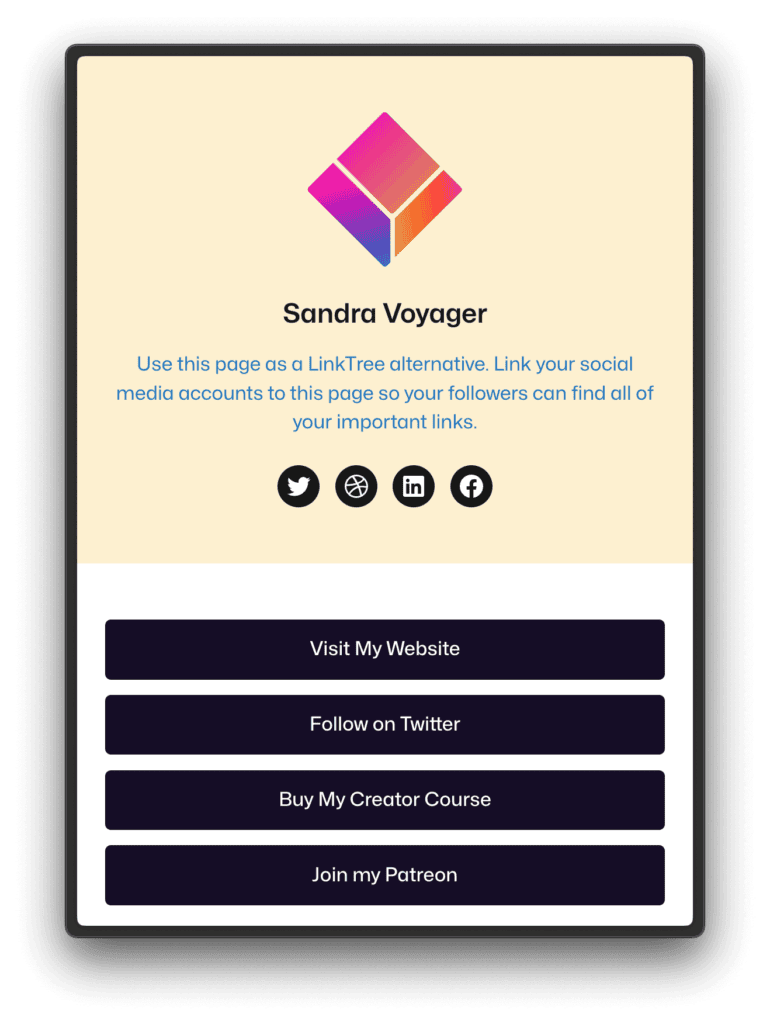
Style it to match your brand. Unlike Linktree, your page can use your actual fonts, colors, and design system. It should feel like a natural extension of your site, not a separate product bolted on.
Add it to your social profiles. Swap out your Linktree URL for your new page URL everywhere — Instagram, TikTok, Twitter/X, YouTube, wherever you have a bio field.
Keep it updated. The whole point is that this page is yours to manage. Add seasonal links, pin your latest post, swap in a new call to action when you launch something. It takes about a minute to edit a WordPress page once it’s built.
If you want to go a step further, a plugin like Pretty Links lets you create clean, trackable short links that live on your domain — yoursite.com/go/shop, for example — which is great for affiliate links, podcast mentions, or anywhere you want to track click-through rates without losing the SEO benefit of keeping traffic on your own site.
The Bigger Point
The appeal of tools like Linktree is that they lower the barrier to doing something rather than nothing. And that’s worth acknowledging — a Linktree page is better than no link at all, and it genuinely works for people who don’t have a website yet.
But if you already have a website, every link you route through a third-party platform is a small vote you’re casting for someone else’s domain over your own. Those votes add up. Your website should be the center of your online presence, not an afterthought that you point to from a Linktree page.
Taking your links back is one of the simplest, most immediate things you can do to strengthen your site’s authority. And you already have everything you need to do it.